Are you ready to transform your living room into a cinematic experience? Installing a home theater system for your TV might seem complicated, but it doesn’t have to be.
With the right steps, you can enjoy crystal-clear sound and stunning visuals without hiring a professional. In this guide, you’ll discover simple, easy-to-follow instructions that make setting up your home theater system a breeze. Keep reading, and soon you’ll be immersed in your favorite movies and shows like never before.
Choosing The Right Home Theater System
Setting up a home theater system can improve your TV experience. Picking the right system is key for good sound and picture.
This guide helps you understand the types of systems, what to think about, and how to plan your budget.
Types Of Home Theater Systems
Home theater systems come in different styles and sizes. Each offers unique features and sound quality.
- Soundbar Systems:Simple setup with one speaker bar. Good for small rooms.
- 5.1 Channel Systems:Includes five speakers and one subwoofer. Offers surround sound.
- 7.1 Channel Systems:Adds two extra speakers for more depth in sound.
- Wireless Systems:Use Bluetooth or Wi-Fi. Reduce cable clutter.
- Custom Built Systems:Designed for large rooms. High-quality parts and installation.
Factors To Consider
Think about your room size, TV type, and how you watch shows or movies. These affect your system choice.
| Factor | Why It Matters |
| Room Size | Large rooms need more powerful speakers. |
| TV Size and Type | Match the system to your TV’s resolution and size. |
| Listening Habits | Music lovers may want better bass and clarity. |
| Space for Setup | Some systems need more room for speakers and wiring. |
| Compatibility | Check if the system works with your devices. |
Budget Planning
Set a budget before buying. Home theater systems vary from affordable to high-end prices.
- Decide how much you want to spend.
- Research systems in your price range.
- Include costs for extra items like cables and mounts.
- Consider installation fees if you want professional help.
- Leave room for future upgrades.
Preparing Your Space
Setting up your home theater system starts with getting your room ready. A good space helps you enjoy clear sound and sharp pictures.
Think about how your room looks and feels. This will improve your viewing and listening experience.
Room Layout And Acoustics
Plan your room layout to avoid sound reflections and echoes. Hard surfaces can cause sound to bounce around.
Use soft materials like curtains, carpets, and cushions to absorb sound. This makes audio clearer and richer.
- Place speakers away from walls to reduce echo
- Add rugs or carpets to the floor
- Use thick curtains on windows
- Avoid large bare walls facing the TV
Optimal Seating Arrangement
Choose a seating spot that is centered to the TV and speakers. This gives the best picture and sound.
Keep seats at a good distance from the screen. Too close or too far can strain your eyes or lose details.
- Place seats at eye level with the TV center
- Keep about 1.5 to 2.5 times the screen size distance
- Arrange seats in a slight curve for surround sound
- Avoid placing seats against walls behind the speakers
Lighting Considerations
Control lighting to reduce glare on the TV screen. Bright lights can wash out the picture.
Use dimmable lights or lamps that can be turned off easily during viewing.
- Install blackout curtains or shades on windows
- Place lights behind the TV for bias lighting
- Use soft, indirect lighting around the room
- Avoid overhead lights that shine on the screen
Essential Equipment And Tools
Installing a home theater system for your TV needs the right equipment and tools. This helps you get the best sound and picture quality.
Knowing what to use and how to set it up makes the process easier. It also improves your viewing experience.
Speaker Types And Placement
There are different speaker types for home theaters. Each type has a special role in sound delivery.
Speaker placement affects how well you hear sound. Correct placement creates clear and balanced audio.
- Front Speakers:These deliver the main sound and dialogue.
- Center Speaker:Placed near the TV for clear voices.
- Surround Speakers:Positioned to the sides or behind for effects.
- Subwoofer:Produces deep bass sounds.
Av Receiver Selection
The AV receiver connects all your devices and powers the speakers. Choose one that fits your speaker setup and TV.
Look for receivers with enough channels for your speakers. Check for modern features like HDMI inputs and audio formats support.
- Number of channels matches speaker count
- HDMI inputs for easy device connection
- Support for Dolby Atmos or DTS:X sound
- User-friendly controls and remote
Necessary Cables And Accessories
You need the right cables to connect the TV, speakers, and receiver. Good cables keep the signal clear.
Accessories help with installation and organization. They keep your setup neat and safe.
- Speaker wires with correct gauge for distance
- HDMI cables for video and audio signals
- Power strips and surge protectors
- Wall mounts or stands for speakers
- Cable ties or clips for neat wiring
Credit: en.community.sonos.com
Step-by-step Installation Process
Setting up a home theater system for your TV can improve your watching experience. This guide will help you install each part correctly.
Follow these steps to connect your TV, AV receiver, speakers, and organize your cables neatly.
Setting Up The Tv
Place your TV on a stable surface or mount it on the wall. Make sure it is at eye level for comfortable viewing.
Connect the TV to a power source but keep the cables loose for now to avoid tension.
Connecting The Av Receiver
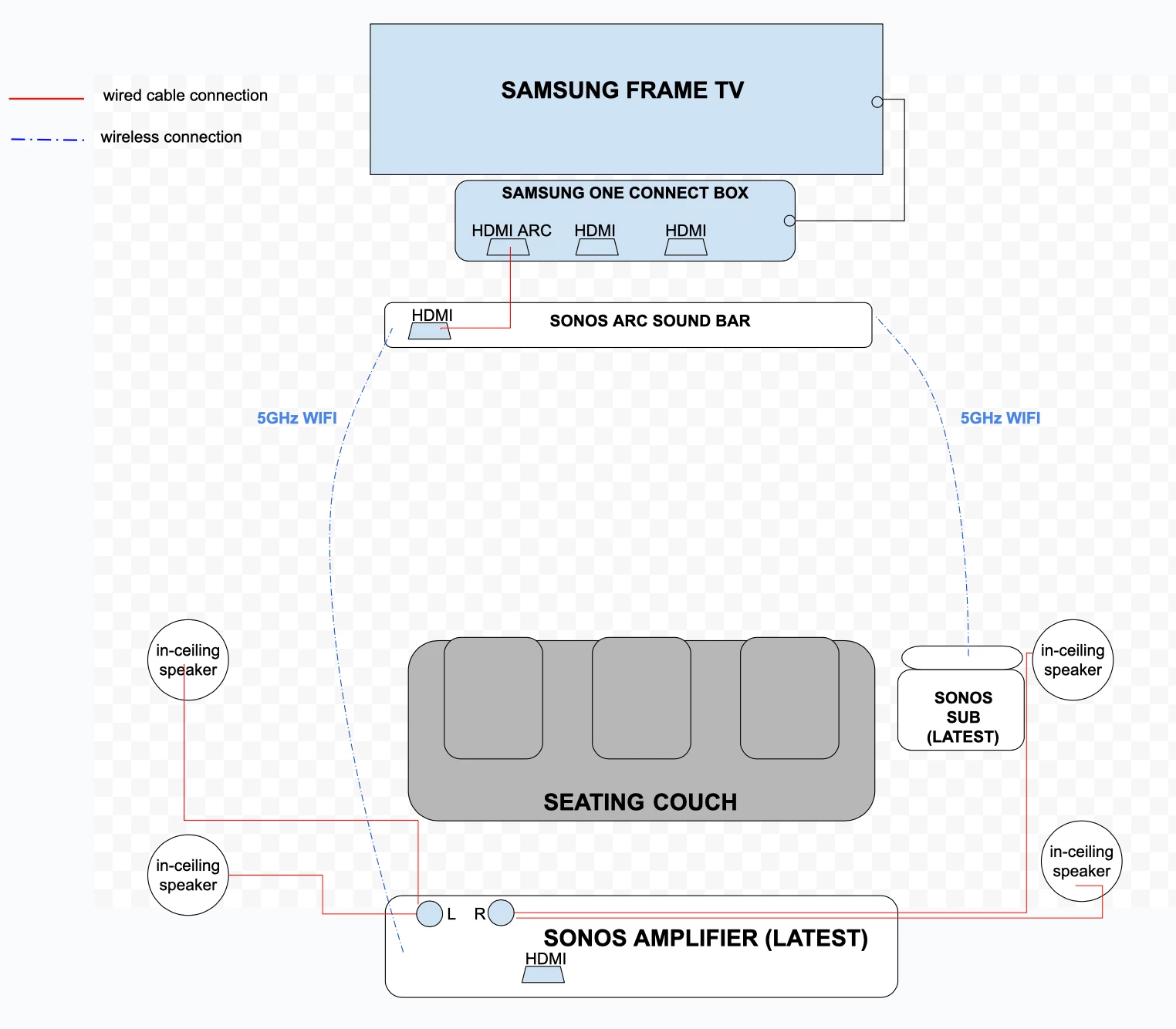
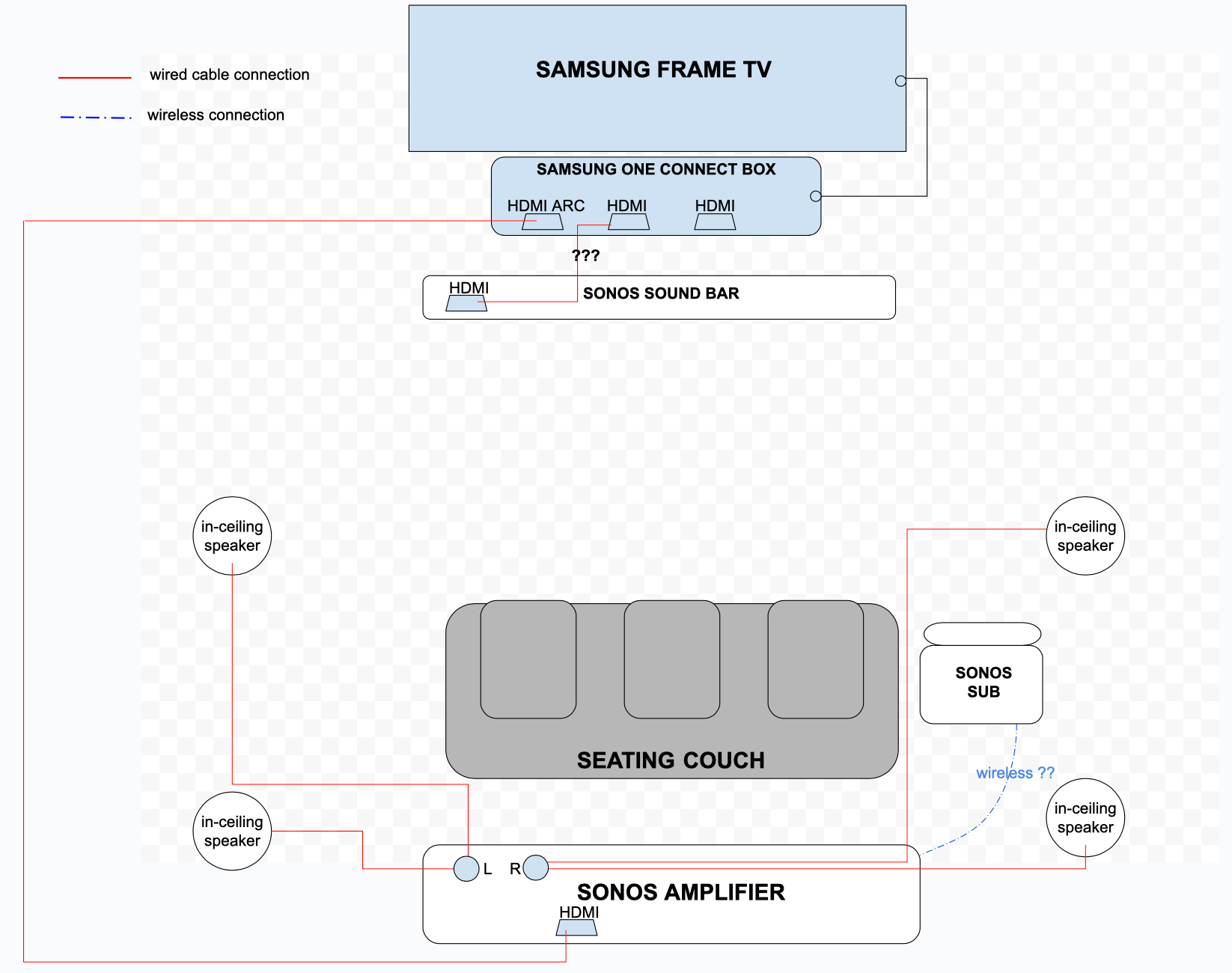
Connect your AV receiver to the TV using an HDMI cable. Use the port labeled “ARC” on both devices for the best audio return.
- Turn off both the TV and receiver before connecting cables.
- Plug one end of the HDMI cable into the receiver’s HDMI OUT (ARC) port.
- Plug the other end into the TV’s HDMI IN (ARC) port.
- Connect the receiver to power and turn it on.
- Switch the TV input to the corresponding HDMI port.
Installing And Positioning Speakers
Place speakers around your room for surround sound. Front speakers go near the TV, while surround speakers sit beside or behind the listening area.
| Speaker Type | Ideal Position | Height |
|---|---|---|
| Front Left and Right | Left and right of TV | Ear level |
| Center | Directly above or below TV | Ear level |
| Surround Left and Right | Beside or behind listening position | 1-2 feet above ear level |
| Subwoofer | Near front speakers or corner | Floor |
Use speaker stands or mounts to secure the speakers if needed. Check connections before final placement.
Wiring And Cable Management
Organize wires to prevent tangling and damage. Use cable ties, clips, or sleeves to bundle cables neatly.
- Label each cable to know its connection.
- Route cables along walls or behind furniture.
- Keep power cables separate from audio cables to avoid interference.
- Check all cables are secure and not stretched.
- Test the system before hiding cables fully.
Configuring Your System
After installing your home theater system, you need to configure it properly. This helps you get the best sound and picture quality.
Proper setup also ensures smooth streaming and easy control of your system. Focus on audio, video, and network settings.
Audio Calibration
Audio calibration balances sound output for your room. It makes sure all speakers sound clear and even.
Use the microphone that comes with your system or a sound meter app. Place the microphone where you usually sit.
- Run the automatic calibration tool in your receiver
- Adjust speaker distances and levels as needed
- Check bass and treble settings for clarity
- Test sound from different speakers
Video Settings Adjustment
Adjust video settings to match your TV and room lighting. This improves the picture quality.
Change brightness, contrast, and color settings on your TV or receiver. Use test patterns if available.
- Set the correct resolution for your TV
- Adjust color temperature for natural colors
- Turn on any motion smoothing or noise reduction features
- Check the HDMI settings for best video quality
Network And Streaming Setup
Connect your home theater system to your Wi-Fi or wired network. This lets you stream movies and music easily.
Set up apps or services on your receiver or smart TV. Make sure your internet speed supports streaming.
- Connect using Ethernet for stable streaming
- Enter Wi-Fi details if using wireless
- Update software and firmware regularly
- Log in to streaming apps like Netflix or Spotify
Troubleshooting Common Issues
Setting up a home theater system for your TV can be exciting. However, sometimes things don't work as expected. Here are solutions to common problems.
These tips will help you fix issues like no sound, connectivity problems, and speaker synchronization.
No Sound Or Poor Audio Quality
If your system has no sound or poor audio, start by checking the volume. Make sure your TV and speakers are not muted. Also, check the audio cables.
If the problem persists, inspect the audio settings. Ensure the correct audio output is selected on your TV and receiver.
- Check for loose cables
- Test different audio settings
- Update firmware if needed
Connectivity Problems
Connectivity issues can affect your home theater experience. Check all HDMI and power cables. Make sure they are securely connected.
Switch input sources on your TV to ensure it's set to the correct one. Verify all devices are powered on.
- Ensure correct input source
- Reconnect cables
- Restart your devices
Speaker Synchronization
Speaker synchronization is crucial for good sound. If speakers are out of sync, adjust the audio delay settings on your receiver.
Ensure all speakers are connected correctly. Check if your system supports automatic calibration.
- Adjust audio delay
- Use automatic calibration
- Verify speaker connections
Maintenance Tips For Longevity
A home theater system can enhance your TV experience. Proper maintenance can keep it working for a long time.
Follow these tips to ensure your home theater stays in top shape. Regular care can prevent issues and extend its life.
Regular Cleaning
Dust and dirt can harm your home theater system. Clean the equipment regularly to keep it working well.
Use soft cloths to wipe surfaces. Avoid harsh chemicals that might damage components.
- Clean screens with a microfiber cloth
- Dust speakers and receivers weekly
- Ensure vents are clear of dust
Software Updates
Software updates can fix bugs and improve performance. Check for updates regularly.
Manufacturers release updates to enhance system features. Keep your system up to date for the best experience.
- Check the manufacturer's website for updates
- Install updates for better performance
- Set devices to update automatically if possible
Protecting Equipment
Protect your home theater from power surges. Use a surge protector to safeguard your investment.
Keep equipment away from direct sunlight and moisture. This helps prevent overheating and damage.
- Use surge protectors for all devices
- Place equipment in well-ventilated areas
- Avoid placing drinks near electronics

Credit: www.youtube.com

Credit: awolvision.com
Frequently Asked Questions
How Do I Connect A Home Theater System To My Tv?
To connect, use HDMI ARC or optical audio cables from the TV to the receiver. This ensures high-quality sound and easy control. Follow your system’s manual for specific port instructions.
Where Should I Place Speakers For Best Sound?
Place front speakers at ear level, side speakers beside seating, and the subwoofer on the floor. This setup creates immersive surround sound, enhancing your viewing experience.
Can I Use Bluetooth For Home Theater Audio?
Yes, many systems support Bluetooth for wireless audio. However, wired connections usually provide better sound quality and lower latency for TV viewing.
What Tools Are Needed To Install A Home Theater System?
You’ll typically need HDMI or optical cables, speaker wire, a screwdriver, and a stud finder. These tools help with connection and secure speaker placement.
Conclusion
Setting up a home theater system for your TV can be simple and fun. Follow the steps carefully to connect all parts correctly. Check the sound and picture quality to enjoy movies fully. Take time to place speakers for the best sound experience.
You will feel like you are in a real theater at home. Enjoy your favorite films with clear sound and sharp images. This setup makes watching TV more exciting and relaxing. Keep your system clean and updated to work well for years.