Are you ready to transform your TV watching experience into something truly immersive? Installing home theater speakers can make a huge difference, but it might seem tricky if you’ve never done it before.
Don’t worry—you’re about to learn simple, step-by-step tips that anyone can follow. By the end of this guide, you’ll know exactly how to set up your speakers for the best sound quality, making every movie night feel like you’re right in the action.
Keep reading, and let’s get your home theater sounding amazing!
Credit: www.theaterseatstore.com
Choosing The Right Speakers
Choosing the right home theater speakers is important for great sound. Good speakers make your TV experience better.
Think about the size of your room and your budget before buying. The right speakers fit your needs and space.
Types Of Home Theater Speakers
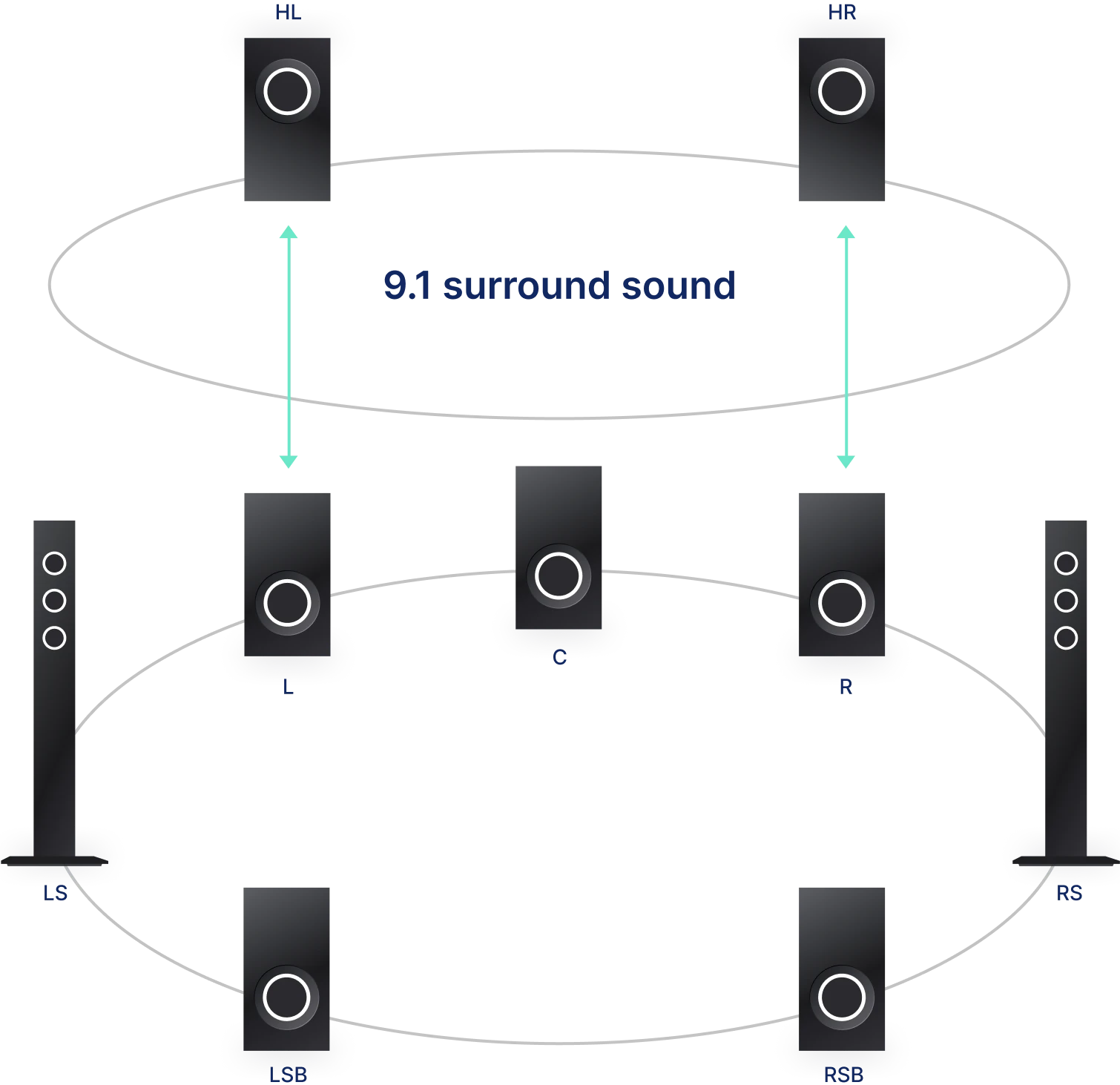
There are several types of speakers for home theaters. Each type has a special role in sound delivery.
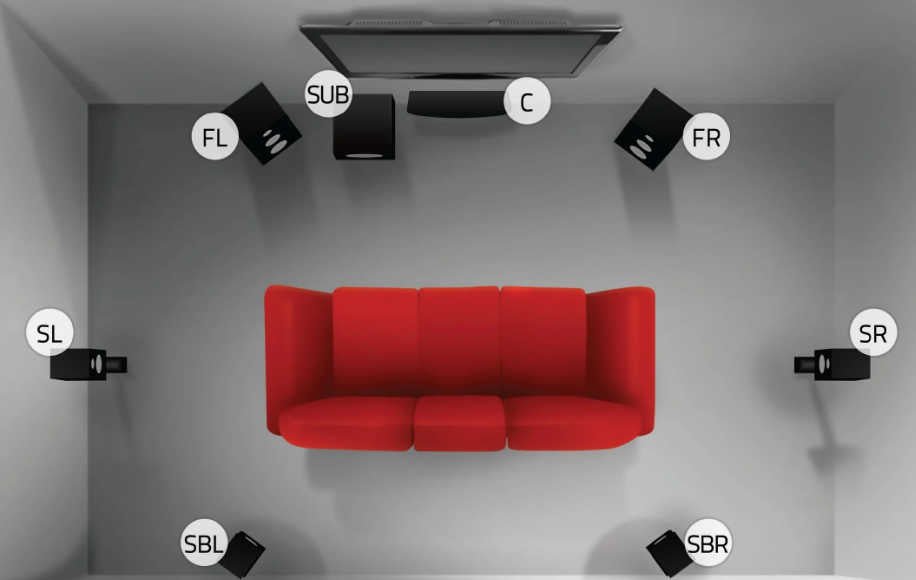
- Front Speakers:These are the main speakers for dialogue and music.
- Center Speaker:It handles most of the dialogue and sits near the TV.
- Surround Speakers:They create ambient sounds and effects around you.
- Subwoofer:It produces deep bass sounds for explosions and music beats.
Speaker Placement Options
Where you place your speakers affects sound quality. Position them to get clear and balanced sound.
Place front speakers near the TV and at ear level. Surround speakers go behind or to the side of the listening area.
- Center speaker below or above the TV
- Front speakers on either side of the TV
- Surround speakers slightly above ear level
- Subwoofer anywhere, but avoid corners for best bass
Matching Speakers To Your Tv
Match your speakers to your TV’s size and power. Bigger TVs need speakers that can fill the room with sound.
Check your TV’s audio output options. Choose speakers that connect easily and work well with your TV’s system.
- Use speakers with compatible connectors (HDMI, optical, or RCA)
- Match speaker power with your TV’s output
- Consider wireless speakers for easy setup
- Look for speakers that support your TV’s sound formats

Credit: www.theaterseatstore.com
Gathering Necessary Tools
Installing home theater speakers for your TV needs proper tools. Gathering these tools first makes the job easier.
Having the right tools helps you work safely and correctly. It also saves time and avoids damage.
Essential Installation Tools
You need some basic tools to install your home theater speakers. These tools help with mounting and wiring.
- Screwdriver set (flathead and Phillips)
- Drill with drill bits
- Wire stripper and cutter
- Stud finder
- Measuring tape
- Level tool
- Hammer
- Electrical tape
These tools let you mount speakers on walls and connect wires safely. A stud finder helps find strong points to fix brackets.
Additional Accessories
Besides basic tools, some accessories make installation easier and cleaner. They also protect your equipment.
- Speaker wire connectors or banana plugs
- Cable clips or wire organizers
- Wall mounts or speaker brackets
- Masking tape for marking spots
- Protective gloves
Using these accessories keeps wires neat and prevents damage. Wall mounts hold your speakers securely in place.
Preparing Your Space
Setting up your home theater speakers starts with a good plan. Preparing the room helps get the best sound.
Clear space and measure the room before placing your speakers. This makes sure the sound spreads well.
Clearing The Area
Remove furniture and items that block speaker sound or take up space. This creates room for speaker placement.
- Move chairs and sofas away from walls
- Clear shelves and tables near speaker locations
- Remove rugs or thick curtains that absorb sound
- Ensure pathways for wiring and speaker stands
Measuring Room Dimensions
Measure your room’s width, length, and height. These numbers help decide speaker size and position.
| Dimension | Measurement |
| Width | ______ feet |
| Length | ______ feet |
| Height | ______ feet |
Planning Speaker Layout
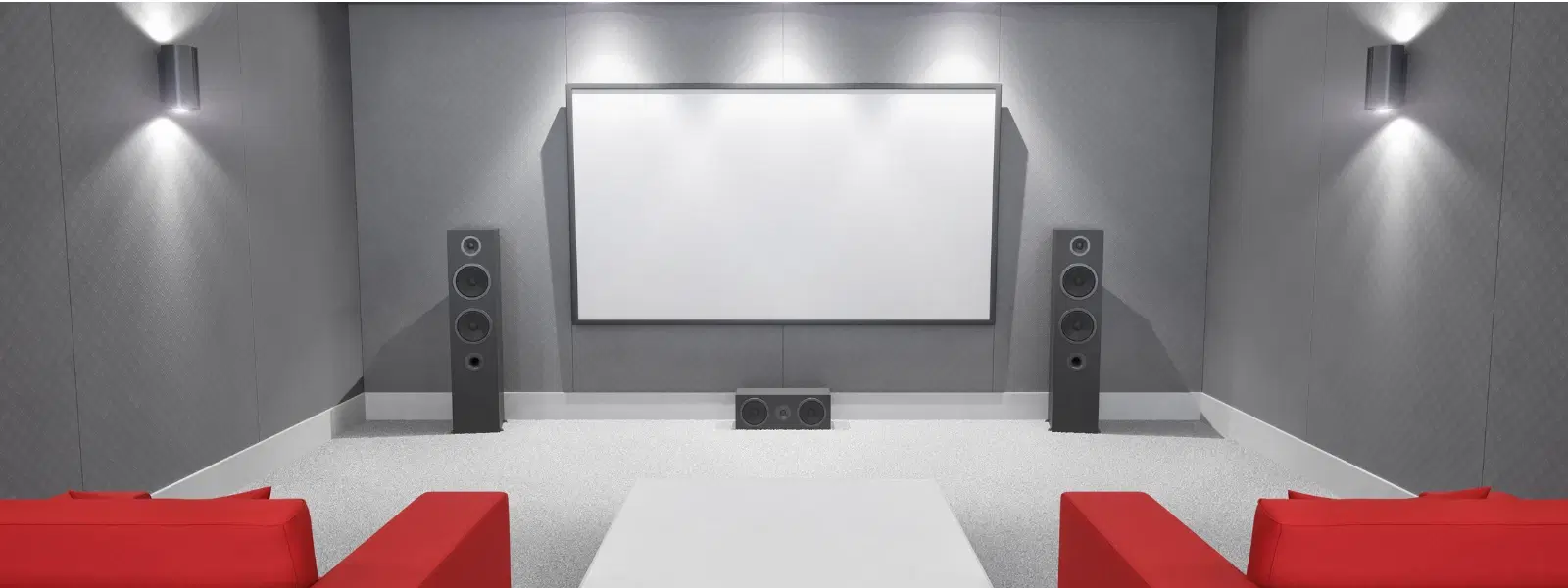
Plan where each speaker will go for the best sound. The layout depends on room shape and seating.
Follow this simple guide for speaker placement:
- Place the front left and right speakers at ear level, angled toward seating.
- Center speaker should go above or below the TV.
- Surround speakers go to the sides or slightly behind the seating area.
- Subwoofer can be placed near a wall or corner for deep bass.
Credit: www.tataneu.com
Wiring And Connections
Installing home theater speakers needs good wiring and connections. Proper setup helps sound reach every corner of the room.
Use the right wires and connect them carefully to avoid issues. This guide covers selecting wire, running it safely, and making the right connections.
Selecting Speaker Wire
Choose speaker wire based on length and thickness. Thicker wire carries sound better over long distances.
- Use 16-gauge wire for runs under 50 feet
- Use 14-gauge wire for runs over 50 feet
- Pick copper wire for better conductivity
- Check the wire insulation type for indoor or outdoor use
Running Wires Safely
Run wires along walls or under carpets to keep them safe. Avoid sharp bends or pinching the wires.
| Safety Tip | Reason |
| Use cable clips | Keeps wires in place and avoids tripping |
| Avoid heat sources | Prevents wire damage and fire risk |
| Label wires | Makes connecting easier and faster |
| Use wire conduit | Protects wires from damage |
Connecting To Receiver And Tv
Connect speaker wires to the receiver and TV terminals. Match positive and negative ends to avoid sound issues.
- Strip wire ends carefully without cutting the wire strands.
- Connect red wire to red or "+" terminal.
- Connect black wire to black or "−" terminal.
- Use banana plugs or spade connectors for a secure fit.
- Double-check connections before powering on.
Mounting The Speakers
Installing home theater speakers for your TV can enhance your viewing experience. Proper mounting ensures optimal sound quality and room aesthetics.
There are various methods to mount your speakers, and each has unique benefits. Choose the method that suits your room and speaker type.
Wall Mounting Techniques
Wall mounting speakers saves space and positions them at ear level. This can improve sound direction and clarity.
- Use brackets designed for your speaker model.
- Ensure the wall can support the speaker's weight.
- Position the speakers symmetrically for balanced sound.
Using Speaker Stands
Speaker stands offer flexibility in positioning and can be moved easily. They are ideal for rooms where wall mounting is not possible.
| Stand Height | Recommended Use |
| Short | Bookshelf speakers |
| Medium | Floor-standing speakers |
| Tall | Surround sound speakers |
Securing Floor Speakers
Floor speakers deliver powerful sound and are often used for the main audio output. They need to be positioned carefully to prevent sound distortion.
Configuring The System
Installing home theater speakers for your TV enhances your viewing experience. Proper configuration ensures optimal sound quality.
This guide will help you set up your system, calibrate audio levels, and test surround sound effectively.
Setting Up The Receiver
The receiver is the heart of your home theater system. It connects all your speakers and manages audio signals.
- Connect the receiver to the TV using an HDMI cable.
- Attach speaker wires to the correct terminals on the receiver.
- Ensure all connections are secure and tight.
Calibrating Audio Levels
Calibrating audio levels ensures balanced sound across all speakers. This creates an immersive experience.
Use the receiver's built-in calibration tool or a sound meter app on your phone:
- Position the microphone or phone at ear level in the main listening area.
- Follow on-screen instructions to adjust volume levels for each speaker.
- Save the settings for future use.
Testing Surround Sound
Testing surround sound verifies that all speakers are working properly. It also checks the audio balance.
| Speaker | Test Sound |
| Front Left | Clear and consistent |
| Front Right | Clear and consistent |
| Center | Dialogue is clear |
| Surround Left | Audible and distinct |
| Surround Right | Audible and distinct |
Troubleshooting Common Issues
Installing home theater speakers can sometimes cause sound or connection problems. Fixing these issues helps you enjoy clear and balanced audio.
This guide covers common problems and ways to solve them. Follow these tips to improve your speaker setup.
Fixing Sound Imbalances
Sound imbalances happen when some speakers are louder or quieter than others. This can spoil the listening experience.
- Check speaker placement and angle for even sound coverage.
- Adjust the volume levels on your receiver or amplifier.
- Use the built-in sound calibration tools to balance speaker output.
- Inspect speaker wires for damage or loose connections.
- Make sure the speakers are the correct distance from the listening area.
Dealing With Connection Problems
Connection issues can cause no sound or poor audio quality. Proper wiring and settings fix most problems.
| Problem | Cause | Solution |
| No sound | Loose or wrong cables | Check and reconnect cables properly |
| Static noise | Interference or damaged wires | Replace cables and move away from electronics |
| One speaker silent | Faulty speaker or wiring | Test speaker and swap cables |
| Remote not working | Wrong input or settings | Select correct input and check remote batteries |
Optimizing Performance
Good performance means clear sound and strong bass. Simple adjustments help get the best from your system.
Try these tips to optimize your home theater speakers:
- Place speakers away from walls to reduce echo.
- Use a subwoofer to improve low-frequency sounds.
- Keep the listening area free of clutter.
- Regularly clean speaker grills and cones.
- Update your receiver’s firmware for better compatibility.
Frequently Asked Questions
How Do I Connect Home Theater Speakers To My Tv?
Use speaker wires or HDMI ARC to connect speakers to your TV. Match the positive and negative terminals carefully. For wireless speakers, pair them via Bluetooth or Wi-Fi using the TV’s settings.
Where Should I Place Home Theater Speakers For Best Sound?
Place front speakers at ear level and surround speakers slightly above. Keep the center speaker below or above the TV. Avoid placing speakers inside cabinets to prevent sound distortion.
What Tools Do I Need To Install Home Theater Speakers?
You need a screwdriver, speaker wire stripper, drill, measuring tape, and mounting brackets. These tools help securely mount and connect your speakers for optimal performance.
Can I Use Existing Wires For Home Theater Speakers?
Yes, if your existing wires are in good condition and compatible with your speakers. Check wire gauge and length to ensure minimal signal loss and proper sound quality.
Conclusion
Installing home theater speakers for your TV can greatly improve sound quality. Follow the steps carefully to place each speaker in the right spot. Use the correct cables and connect them securely. Test the system to ensure clear, balanced sound.
Enjoy movies and shows with richer audio at home. Taking your time makes the setup easier and more effective. Now, you can create a simple and enjoyable home theater experience.