Are your speaker wires cluttering the space behind your TV? Tangled cords can ruin the clean, sleek look you want for your entertainment area.
But don’t worry—you don’t have to live with that mess. Imagine a neat, organized setup where wires disappear from sight, making your room look polished and inviting. In this guide, you’ll learn simple, effective ways to hide those speaker wires quickly and safely.
Keep reading, and transform your TV area into the stylish space you deserve.
Choosing The Right Cable Management
Hiding speaker wires behind your TV makes your space look neat. Choosing the right cable management helps keep wires organized and safe.
There are several ways to hide wires. Some methods are easy to install. Others offer better protection for your cables.
Types Of Cable Covers
Cable covers come in many shapes and sizes. They hide wires by covering them with a plastic or rubber shell. These covers can be painted to match your wall color.
- Flat covers that stick to the wall
- Flexible covers that bend around corners
- Decorative covers that blend with room style
Using Raceways And Channels
Raceways and channels are hard plastic or metal paths that hold wires. They keep wires safe from damage and prevent tangling.
| Type | Material | Best Use |
| Raceway | Plastic or metal | Long straight runs |
| Channel | Plastic | Wires around corners |
Cable Sleeves And Ties
Cable sleeves group wires together for a clean look. Ties keep wires from moving and get tangled.
- Velcro ties for easy adjustment
- Plastic zip ties for a tight hold
- Fabric sleeves for flexible cable bundling

Preparing Your Setup
Hiding speaker wires behind your TV creates a clean and organized look. You need to prepare your setup before you start.
This preparation will save time and prevent mistakes while hiding the cables.
Measuring Cable Length
Measure the distance from your speakers to the TV carefully. Add extra length to reach power outlets or connectors.
Accurate measurement helps avoid cables that are too short or too long.
- Measure straight from speaker to TV
- Add at least 1-2 feet for slack
- Include length for bends around corners
- Check length for power and audio connections
Clearing The Wall Space
Clear the area behind your TV to make space for wires. Remove furniture or decorations that block access.
Check the wall for obstacles like outlets or switches. This helps plan where to hide the wires safely.
- Move furniture away from the wall
- Remove picture frames or shelves
- Inspect wall for outlets and switches
- Clean dust and dirt from the area
Gathering Necessary Tools
Collect all tools before starting to hide wires. This keeps your work smooth and fast.
Having the right tools helps secure cables and protects your walls.
- Measuring tape
- Cable clips or adhesive hooks
- Cord covers or raceways
- Drill and screws (if needed)
- Wire strippers and scissors
- Level to keep cables straight
Step-by-step Wiring Process
Hiding speaker wires behind your TV keeps your space neat. This process is simple and can be done with a few tools. Follow the steps carefully for the best result.
Each step focuses on organizing, covering, and securing the wires. This guide helps you improve your TV area without damage.
Disconnecting And Organizing Wires
Start by unplugging all speaker wires from your TV and audio devices. Lay them flat and sort by length and type. This makes it easier to manage the cables later.
- Turn off and unplug all devices.
- Disconnect speaker wires from the TV and receiver.
- Straighten wires and remove any knots.
- Group wires by length and function.
- Use twist ties or Velcro straps to bundle wires.
Attaching Cable Covers
Cable covers protect and hide your wires along the wall. Choose covers that match your wall color. Attach them to keep wires out of sight and safe from damage.
| Material | Best Use | Installation Tip |
| Plastic Raceway | Indoor walls | Use adhesive backing for smooth surfaces |
| Fabric Cable Sleeve | Visible areas | Wrap and secure with Velcro |
| Wire Mold | High-traffic areas | Screw to the wall for strong hold |
Securing Wires Behind The Tv
After covering wires, secure them behind the TV. This prevents accidental pulling and keeps wires tidy. Use clips or hooks designed for cable management.
- Attach adhesive cable clips to the back of the TV stand.
- Guide wires through clips to keep them tight.
- Leave some slack near connections to avoid stress.
- Check that wires do not block ventilation or remote signals.
- Tuck excess wire into cable covers or behind furniture.

Using In-wall Solutions
Hiding speaker wires behind your TV creates a clean look. In-wall solutions keep wires out of sight and safe.
This guide explains how to use in-wall cable kits and run wires through wall cavities. Follow safety rules and building codes.
Safety And Building Codes
Before running wires inside walls, check local building codes. Different places have rules to keep homes safe.
Use cables rated for in-wall use. These cables reduce fire risks and meet safety standards.
- Use fire-rated speaker wires (CL2 or CL3 rated)
- Avoid damaging electrical wires or plumbing
- Follow local building and fire codes
- Turn off power before working inside walls
Installing In-wall Cable Kits
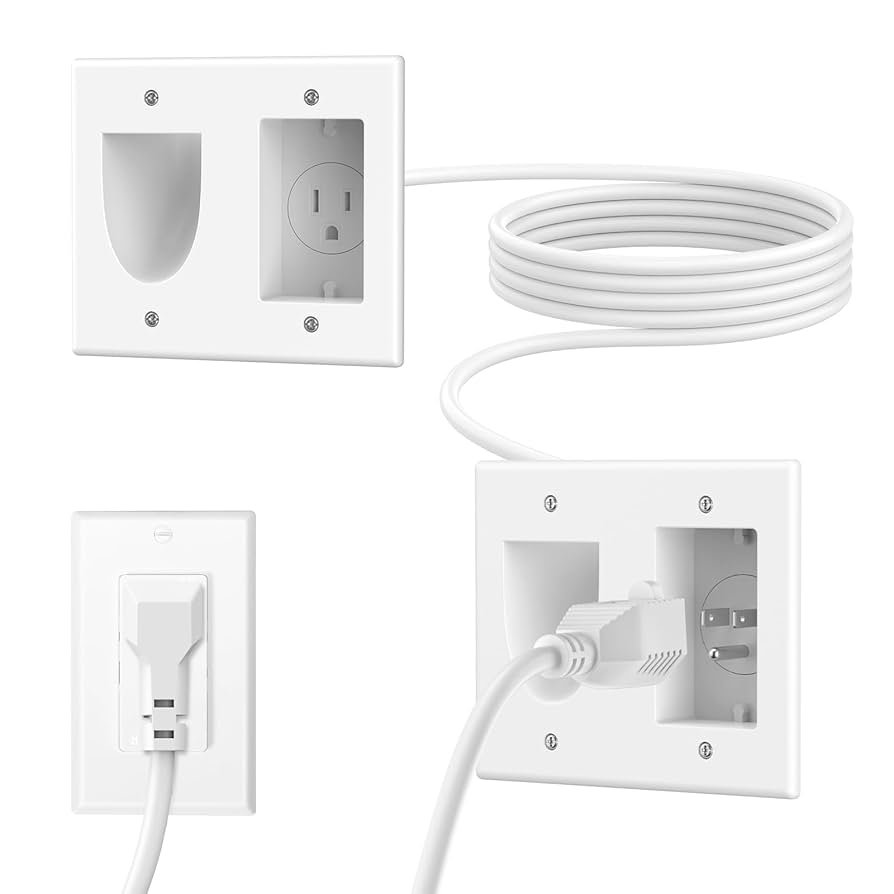
In-wall cable kits include wall plates, cables, and tools. These kits help run wires cleanly and safely behind walls.
Start by cutting holes in the drywall where the TV and speakers are. Attach wall plates to these holes for a neat finish.
- Cut drywall holes using a stud finder and a drywall saw
- Install wall plates with brush or speaker terminals
- Feed speaker wires through the plates
- Use cable fish tape to pull wires through walls
Running Wires Through Wall Cavities
Run wires inside wall cavities between the TV and speakers. Avoid studs, pipes, and electrical cables.
Use a fish tape or wire puller to guide wires through the cavities. Keep wires flat and secure to prevent damage.
- Locate studs with a stud finder
- Make sure wires do not cross electrical wiring
- Use fish tape to pull wires through cavities
- Seal holes after wiring to keep walls airtight
Maintaining A Clean Look
Speaker wires can create clutter around your TV area. Hiding them keeps your space neat and tidy. A clean look improves your room’s style and makes cleaning easier.
Use simple tricks to hide wires without too much effort. These tips help your TV setup look smooth and organized.
Color Matching And Paint Options
Match the speaker wires to your wall color to make them less visible. Use paint or colored sleeves to blend wires with the background.
Paint options work well for wires running along walls or baseboards. Choose paint that is the same shade and finish as your walls for the best effect.
- Use flat paint for matte walls
- Glossy paint works on shiny surfaces
- Colored wire covers can hide cables on light or dark walls
- Test paint on a small wire section before applying
Hiding Cables With Furniture
Place furniture to block wires from view. Use TV stands, shelves, or cabinets to cover cables without extra tools.
Arrange furniture close to the wall or TV to hide wires behind them. This creates a clean look while keeping cables easy to access.
- Use a TV console with cable management holes
- Place books or décor items to cover wires on shelves
- Install a low cabinet under the TV to hide wires inside
- Keep furniture close enough so wires don’t show out
Regular Cable Maintenance Tips
Check your speaker wires regularly to keep them neat. Dust and move cables to avoid tangles and damage.
Use simple tools like zip ties or cable clips to keep wires organized. Replace damaged wires quickly to avoid issues.
- Inspect wires once a month for wear or dust
- Use cable ties to bundle wires together
- Label cables to identify each wire easily
- Keep cables off the floor to prevent damage
Alternative Wireless Options
Hiding speaker wires can be tricky. Wireless options provide a neat solution. They eliminate the need for visible cables.
Wireless systems connect your speakers without the clutter. Let's explore some common wireless options.
Wireless Speaker Systems
Wireless speaker systems use Wi-Fi or Bluetooth. They connect speakers to your TV without wires.
- Easy to set up and use
- No visible wires behind the TV
- Compatible with most modern TVs
Bluetooth Connectivity
Bluetooth is a popular choice for wireless speakers. It pairs devices within a short range.
| Feature | Description |
| Range | Typically up to 30 feet |
| Compatibility | Works with most smartphones and tablets |
| Sound Quality | Good for casual listening |
Pros And Cons Of Wireless Setup
Wireless setups have benefits and drawbacks. Knowing them helps in making an informed choice.
- No cables cluttering the area
- Easy to move and rearrange speakers
- Simple integration with smart home systems
Cons:
- May require additional setup for pairing
- Potential interference from other devices
- Sound quality may vary with distance

Frequently Asked Questions
How Can I Hide Speaker Wires Behind My Tv Easily?
Use cable management kits or adhesive cable clips to secure wires along the wall. Conceal wires with cable raceways or behind furniture for a neat look.
Are Cable Raceways Effective For Hiding Tv Speaker Wires?
Yes, cable raceways are great for hiding wires. They protect cables and blend with wall colors for a clean appearance.
Can I Hide Speaker Wires Without Drilling Holes?
Yes, use adhesive cable clips or Velcro straps. These options secure wires neatly without damaging walls.
What Tools Do I Need To Hide Speaker Wires Behind Tv?
You need cable clips, raceways, Velcro strips, a measuring tape, and a screwdriver for installation.
Conclusion
Hiding speaker wires behind your TV keeps your space neat and tidy. It also protects the wires from damage and tripping hazards. Simple tools and a bit of time make the job easy. Choose the method that fits your room and budget best.
Enjoy a clean look and better sound experience. Small changes can make a big difference in your home setup. Give your entertainment area a polished and organized feel today.